Java Variables
Variables are containers for storing data values.
In Java, there are different types of variables, for example:
- String - stores text, such as "Hello". String values are surrounded by double quotes
- int - stores integers (whole numbers), without decimals, such as 123 or -123
- float - stores floating point numbers, with decimals, such as 19.99 or -19.99
- char - stores single characters, such as 'a' or 'B'. Char values are surrounded by single quotes
- boolean - stores values with two states: true or false
Declaring (Creating) Variables
To create a variable, you must specify the type and assign it a value:
type variableName = value;
Where type is one of Java's types (such as int or String), and variableName is the name of the variable (such as x or name). The equal sign is used to assign values to the variable.
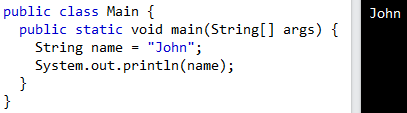
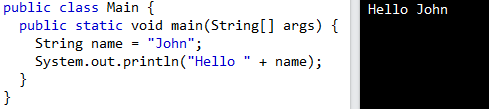
To create a variable that should store text, look at the following example:
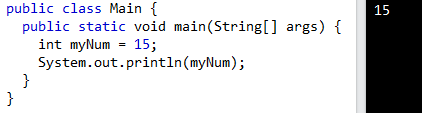
To create a variable that should store a number, look at the following example:
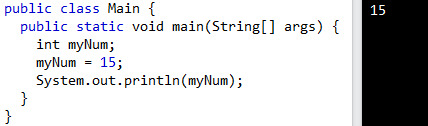
You can also declare a variable without assigning the value, and assign the value later:
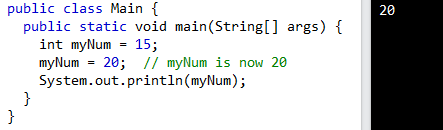
Note that if you assign a new value to an existing variable, it will overwrite the previous value:
Final Variables
If you don't want others (or yourself) to overwrite existing values, use the final keyword (this will declare the variable as "final" or "constant", which means unchangeable and read-only):

Other Types
A demonstration of how to declare variables of other types:
int myNum = 5;
float myFloatNum = 5.99f;
char myLetter = 'D';
boolean myBool = true;
String myText = "Hello";
Display Variables
The println( ) method is often used to display variables.
To combine both text and a variable, use the + character
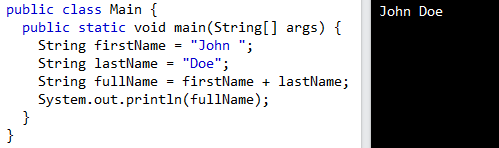
You can also use the + character to add a variable to another variable:
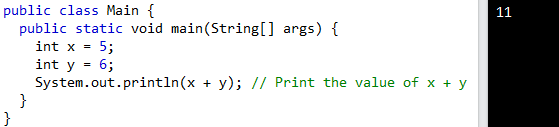
For numeric values, the + character works as a mathematical operator (notice that we use int (integer) variables here):
Declare Many Variables
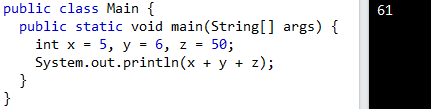
To declare more than one variable of the same type, you can use a comma-separated list.
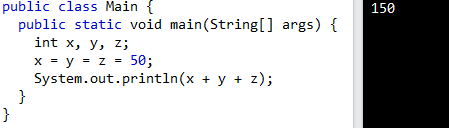
One Value to Multiple Variables
You can also assign the same value to multiple variables in one line.
Identifiers
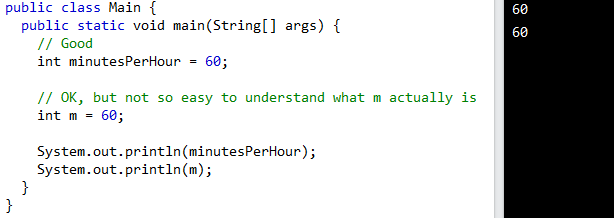
All Java variables must be identified with unique names. These unique names are called identifiers.
Identifiers can be short names (like x and y) or more descriptive names (age, sum, totalVolume).
Note: It is recommended to use descriptive names in order to create understandable and maintainable code.
The general rules for naming variables are:
- Names can contain letters, digits, underscores, and dollar signs
- Names must begin with a letter
- Names should start with a lowercase letter and it cannot contain whitespace
- Names can also begin with $ and _ (but we will not use it in this tutorial)
- Names are case sensitive ("myVar" and "myvar" are different variables)
- Reserved words (like Java keywords, such as int or boolean) cannot be used as names