Strings in Java
It's common practice to save the text in strings.
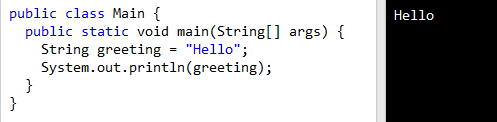
Characters encased in double quotes are what make up a String variable.
Length of a String
In Java, strings are represented by objects called Strings, and these Strings have access to methods that allow for various string manipulations. There is a length() method, for instance, that can be used to determine how long a string is:
New String Techniques
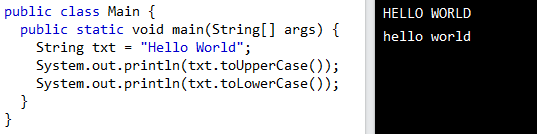
Strings can be converted to and from different case forms using methods like toUpperCase() and toLowerCase().
Recognizing a Single Letter in a String
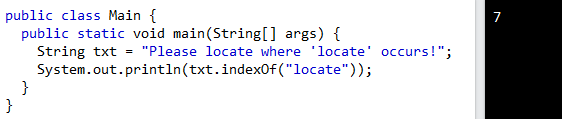
When passing a string, the indexOf() method will return the index (or position) of the first occurrence of the specified text within the string, including any whitespace.

String Concatenation
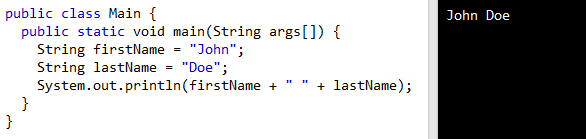
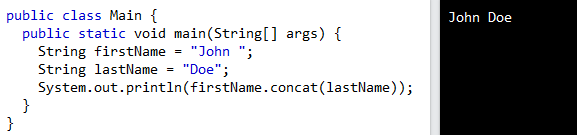
To join two strings together, use the plus (+) operator. Concatenation describes this process. It's also possible to use the concat() function to join together multiple strings.
Adding Numbers and Strings
WARNING! Java's + operator doubles as a concatenation operator. Addition takes place. The joining of strings.
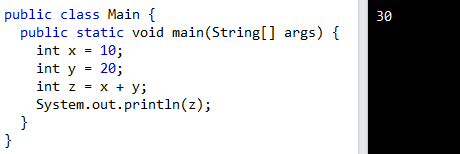
If you add two numbers, the result will be a number:
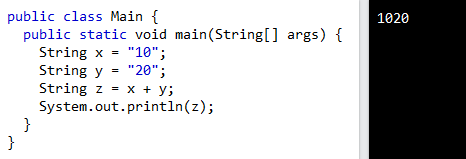
If you add two strings, the result will be a string concatenation:
If you add a number and a string, the result will be a string concatenation:
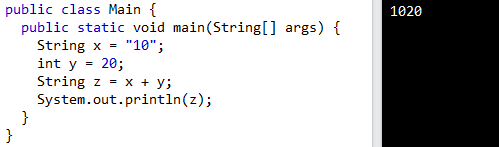
Java Special Characters
Strings - Special Characters
Because strings must be written within quotes, Java will misunderstand this string, and generate an error:
String txt = "We are the so-called "Vikings" from the north.";
The solution to avoid this problem, is to use the backslash escape character.
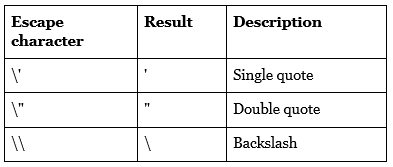
The backslash (\) escape character turns special characters into string characters:
The sequence \" inserts a double quote in a string:

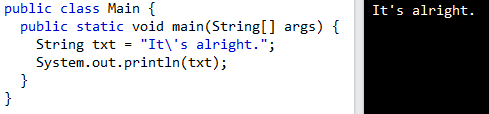
The sequence \' inserts a double quote in a string.
The sequence \\ inserts a single backslash in a string:

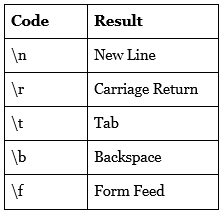
Other common escape sequences that are valid in Java are: